Introduce your new product to potential customers by email
Identify relevant people for your new product or SaaS, write a short introduction and plan your follow-ups. Start with sample messages and a list structure.
Contents
- 1. Start with one use case
- 2. Identify relevant people
- 3. Ask for one thing in the first email
- 4. Make the personal note specific
- 5. Plan sending and follow-ups separately
- 6. What can you write if there is no reply?
- 7. Look beyond the number of emails sent
- When should you choose another approach?
- Prepare the first step
When you build a new product or project, start by explaining whose problem it solves. Then identify a small group of people who may actually have that problem, prepare a short message and follow up on their replies.
This guide is for independent developers and small teams using email to start their first customer conversations. Preparing a list, understanding the need, sending a message and making a sale are separate tasks. An email sending tool does not do all of them for you.
1. Start with one use case
Your product may do several things. Instead of describing every feature in the first email, focus on one task for one type of person.
Write down your answers:
- Who will use it?
- How do they handle the task now?
- Where do they lose time or struggle?
- Which part does your product change?
- What do you want to learn in the first conversation?
For example:
I want to help people at small agencies who manually pull together weekly client reports from several sources.
That description makes it easier to prepare a useful list and message than a broad line such as “An AI-powered platform for every business.”
2. Identify relevant people
Do not build your first list only around company size or industry. Choose people for whom you can explain why the message might be relevant.
A simple working spreadsheet:
| Field | Why it matters |
|---|---|
| Person and company | Know who you are writing to |
| Relevant role or task | Assess the connection to your product |
| Contact source and permission status | Check the conditions under which you can write |
| Observation or conversation note | Establish context |
| Requested next step | A short question, example or conversation |
A public email address does not by itself give permission for every kind of contact. Consider the recipient, purpose and applicable rules. Rather than starting with a large purchased list, focus on people whose relevance you can explain.
Do not keep contact details in a publicly accessible spreadsheet. Limit access to team members who actually need it.
3. Ask for one thing in the first email
The first message does not have to complete the sale. A short question, an offer to share an example or finding out whether the need exists can be a suitable start.
A simple structure:
- Why are you writing to this person?
- Which task are you trying to make easier?
- What small next step are you asking for?
Example: a new reporting tool
Subject: A short question about weekly client reports
Hi,
I am building a tool to make it easier for small agencies to put weekly client reports together from different sources.
If you prepare these reports manually, I would like to understand which part takes the most time. How does the process work in your team?
Tufan
This is an illustrative message, not a claim about a real customer result or completed study. Adapt the name, product and problem to your own situation.
Example: someone you have spoken with before
Subject: The reporting process we discussed
Hi,
In our last conversation, you mentioned how much time client reports take to prepare.
I can share a short example of the first version I have built for this. Would you be open to taking a look?
Use this only if the conversation really happened. Implying the same previous relationship with every recipient undermines trust.
4. Make the personal note specific
Instead of “I was impressed by your company,” which could go to anyone, use a real detail that explains why the message is relevant.
Examples:
- “In our last conversation, you mentioned preparing weekly reports manually.”
- “We discussed sample tracking for your product range.”
- “In the report example your team shared, I noticed this step is prepared separately.”
Do not invent details you do not know. Avoid writing as if you are certain about a company’s internal processes from outside.
Keep each person’s sentence in a separate spreadsheet column. The spreadsheet guide explains how to place it in their message.
5. Plan sending and follow-ups separately
When the message is ready, decide:
- Which email account will you use?
- On which days and at which hours should emails be sent?
- Is a follow-up needed if there is no reply?
- What happens after a reply or an opt-out?
- When will you review the results?
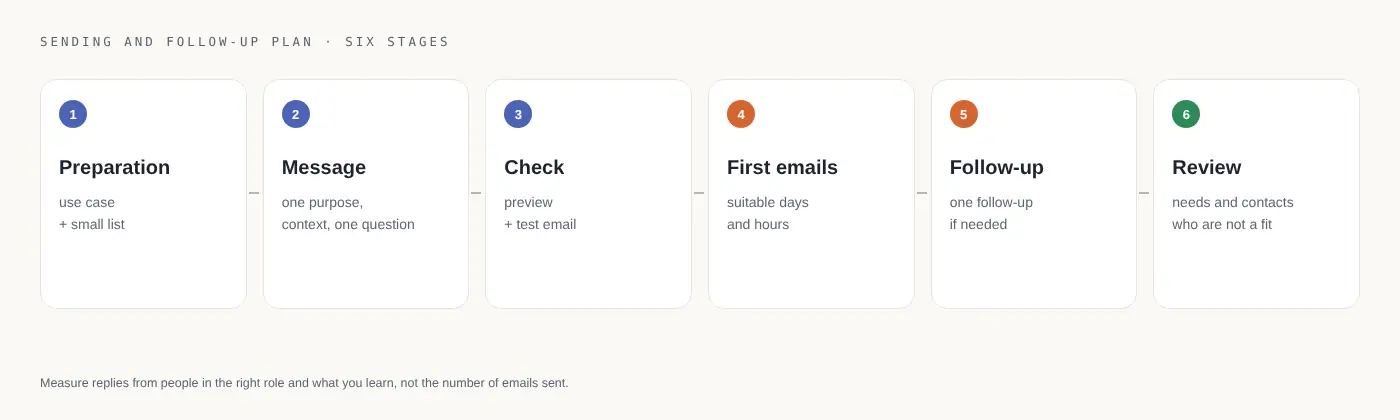
An example plan:
| Stage | What to do |
|---|---|
| Preparation | Define a use case and small contact list |
| Message | Write a purpose, short context and one question |
| Check | Review several previews and a test email to yourself |
| First emails | Start within appropriate days and hours |
| Follow-up | Prepare a follow-up only if needed for people who have not replied |
| Review | Note needs mentioned in replies and contacts who are not a fit |
If you want to automate this part, uLemio is one option for small lists. Use a CSV/XLSX list, send through your own email account and add optional follow-ups. Once a reply is detected, remaining follow-ups to that person stop.
uLemio does not find customer lists, answer conversations or guarantee customers. Its interface is available in Turkish and English. The first 100 accounts joining the pilot are free and stay free; see the product page for current account and daily limits.
6. What can you write if there is no reply?
Briefly refer to the first message and offer an option:
Hi,
I shared a short question about your reporting process.
If this is not a priority right now, no problem. If useful, I can send the example I have prepared by email.
Adapt the message before copying it. For more options, see the follow-up email guide.
Stop if the person does not want further contact. Read automatic out-of-office replies and decide the next step deliberately; uLemio counts them as replies and stops that person’s follow-ups.
7. Look beyond the number of emails sent
More useful questions in your first customer conversations are:
- Did the message reach someone in the relevant role?
- Did someone with the problem reply?
- Which part of the product interested them?
- Which assumption turned out to be wrong?
- What should change in the next conversation?
A small exercise with twelve people can help you see which messages draw replies. Do not infer a reliable market-wide conversion rate from that small sample. A sent email does not prove inbox placement or reading either.
When should you choose another approach?
If you cannot yet explain whose problem you solve, begin with direct conversations and research. For a large subscriber announcement, consider newsletter tools. If uLemio does not support your email provider, do not assume you can connect the account.
Email is one way to reach people. Product communities, existing contacts and direct conversations can help you learn too.
Prepare the first step
Write down one use case, a short list of relevant people and one easy-to-answer question. Prepare the send after those three things are clear.